A Jesus icon.
Jesus saves.
I’ve seen HDD icons as a replacement for the floppy.
SD card. Half is old timers won’t even realize it’s not a floppy disk.

Yet 90% of young people won’t know what it is because digital cameras have been replaced by phones and phones no longer have microSD lol
Gotta give the next gen something to complain about.
I think we should just keep the floppy disk symbol at this point, because it doesn’t matter what it was originally based on or whether that exists any more–everyone knows what that symbol means, and it can’t really be confused with anything else.
There’s no point making an icon that looks like any other particular kind of storage device since those are changing all the time. So we either have to pick some real world thing like a safe or warehouse or grain silo or whatever. or invent some completely new symbol that’s not related to anything and then everyone would have to learn it. Which takes us back to just keeping the floppy disk symbol.
grain silo
This is a hilariously awkward suggestion. At the scale of the average save icon, what do you think a grain silo symbol would look like?
like this?

drawing a grain silo doesn’t mean you have to draw the grains.
I reject the question. That’s not a picture of a floppy disc, that is the glyph that means save
You literally called it the save symbol. And that’s what it is…100 years from now, if we’re still around and still have computers, the save icon will still be some stylized glyph based on the floppy disc
The existence of the floppy disc is already just a bit of trivia about the save icon
It’s like asking what we should change the Bluetooth symbol to? Why do you yearn for the world to burn?
An icon can be any random glyph, but it has to stay recognizable and consistent in meaning, that’s the entire concept here

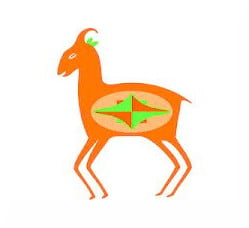
By OP’s logic, this
#A
is a drawing of an ox head.
Hope you are right.
But really the Save icon will become: ✨
thats’s the Google AI icon
“All your base (data) are belong to us” -Google AI
… Why is the generative llm glyph here? nervous
⬇️ or

To me this means download
Thats for downloading though.
That’s for downloading though.
Right.
When you grab something from somewhere else and do “what” with that thing you “downloaded?”
Like what are you doing with that file? ***ing it to your hard drive of some kind… what do you call that?
To **** a file you downloaded?
“Downloading” is how you acquire any external data to your internal storage media.
What are we doing to the file? ****Ing it?
I’m not downloading when I save a file I edited locally on my computer.
But like, what if, you’re like … “downloading” the file … from memory … to disk? … man?
You take an online thing and make it local.
I understand how some younger folk might not see as stark a contrast in saving v downloading.
I’d say if you’re 30+, you prolly do.
“Downloading” is how you acquire any external data to your internal storage media.
Aaahhaha. I didn’t even read that bit before writing my first lines, and that only confirms my doubts.
Never seen these, eh?

You can curse on Lemmy.
You a bot?
Edit: Oh, I see it now.
They aren’t censoring swearwords. 5they are blanking it out to make a point about the word save.
Thanks for pointing out. I totally missed that.
Need to disambiguate between saving locally and saving directly to cloud storage.
If Windows gets their way you don’t!
the final fantasy 7 save crystal. because just look at it. LOOK AT IT!
It’s so goofy looking lol
But I like the floppy disk save symbol
Reel to reel tape? Ahahaha

What a save!
Chat disabled for 3 seconds.
Okay.
Wow!
This is the correct answer.
A PSX Memory Card, because that would be awesome.
Core memory. It’s non-volatile.
Just remove it all together and use only keyboard shortcuts
Animated Save Album from Mario and Luigi Partners in Time:

I cant find a gif of this, but the rainbow section is supposed to be animated, and the book opens when you hit (click) it.
Nothing. Why do I need to manage storage myself? Everything i do should just be automatically saved. Each doc should essentially be version control so you can intelligently step back and fork if you need to.
I hate this. No auto save please.
back and forth*
Though I do like your version better.
I meant fork, in the git sense. Scroll back to a previous point and take a different path. But yes, also back and forth
Oh. Hehe. Well I stand corrected.